

WHO IS JONATHAN STROUD?
Jonathan Stroud is a highly skilled business consultant with a focus on paid acquisition, sales funnels, and direct response marketing.
Jonathan's expertise is in paid acquisition, including the use of Meta Ads and TikTok Ads.
He has a deep understanding of how to drive strong returns on investment (ROI) for his clients, and has helped hundreds of entrepreneurs increase their profitability and make a meaningful impact in their communities.
More About Jonathan
In addition to his skills in paid acquisition and direct response marketing, Jonathan is also well-known for his ability to build highly effective sales funnels.
He has a keen eye for identifying opportunities for optimization and has helped hundreds of businesses streamline their sales processes and increase their overall revenue.
Jonathan's dedication to helping entrepreneurs succeed has earned him numerous accolades, including the prestigious 2 Comma Club Award from ClickFunnels. This award is given to only the top 1% of entrepreneurs who have achieved over $1 million in sales through a single sales funnel, and is a testament to Jonathan's expertise and success in the industry.
Jonathan's passion for helping others succeed, combined with his expertise and track record of success, make him a valuable asset to any business looking to grow and thrive.
Whether you're a small startup or a well-established company, Jonathan has the skills and experience to help you reach your goals and achieve long-term success.
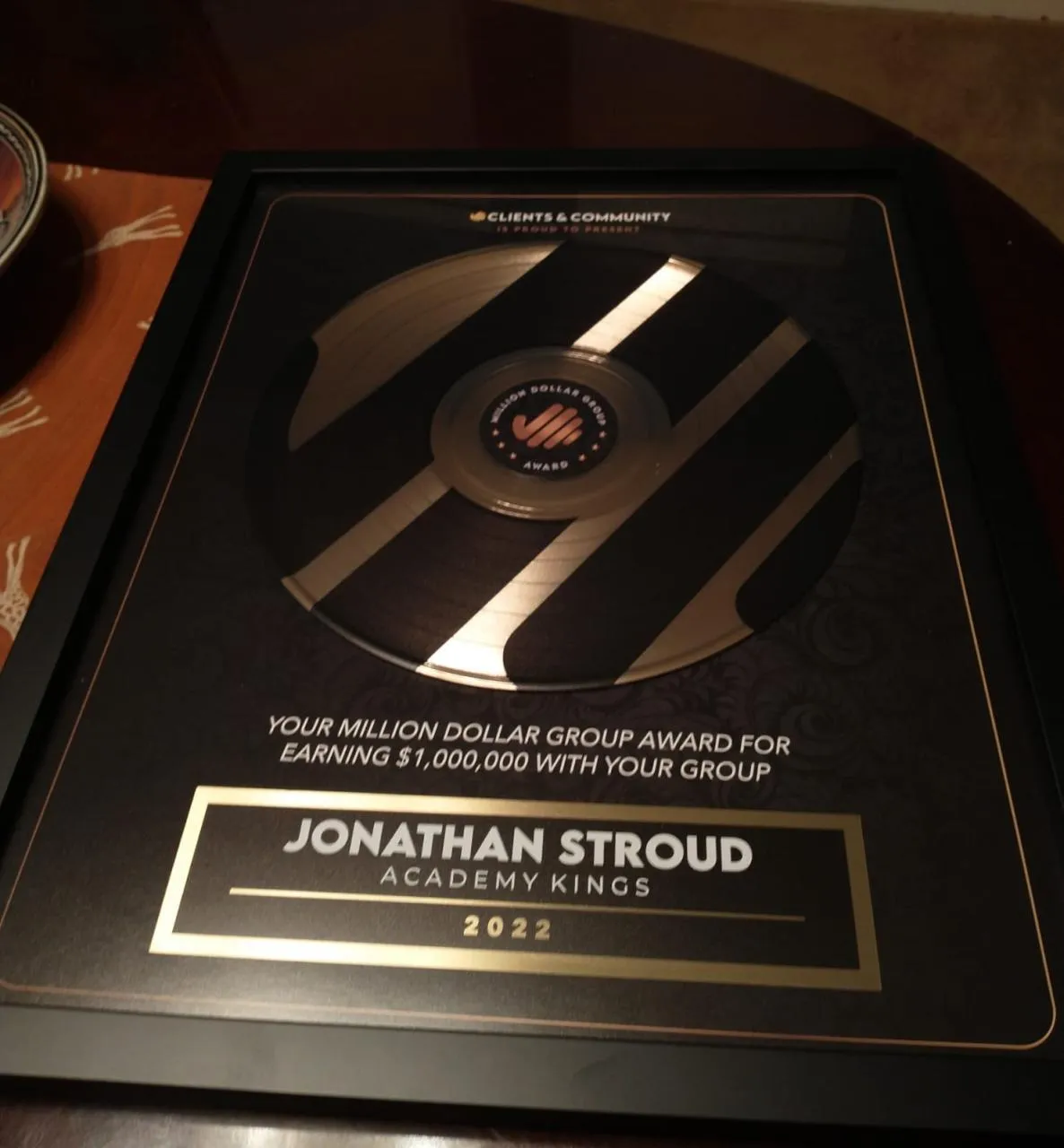
$1,000,000 Award For Group Ads Funnel
Awarded Paid Ads Facebook Group Sales Funnel That Generated Over $1,000,000+ in Sales Awarded by Clients & Community.


PASSIONS
All things Space,
marketing,
sales funnels & paid ads.
Reading & learning
Growth mindset.

3X NASA SOCIAL
Attended Multiple NASA Social to include:
Journey to Mars SLS Engine Test
ORBITAL ATK: ANTARES RETURN TO FLIGHT
NASA's Langley Research Center splashdown test of the Orion Crew Module.

COPYWRITING
After college, was freelancee copywriter with USRA for NASA's SOFIA Telescope.
& had a space blog where interviewed Apollo 15 & STS Astronauts monetized through affiliate marketing & influencer strategies.
Featured ON:







GET TO KNOW JONATHAN BETTER:



Read Jonathan's Latest Blogs Here:
10 GoHighLevel Workflows for Space Sales Teams
Affiliate disclosure: Space Launch Agency is a HighLevel affiliate and may earn a commission if you sign up through our links, at no extra cost to you. We run our own website on HighLevel and offer HighLevel setup for space companies. Check HighLevel's own signup page for current terms.
TL;DR: These 10 GoHighLevel (HighLevel) workflows cover the follow-up a B2B space sales team usually misses: instant replies to new leads, call confirmations and prep tasks, next steps when a deal changes stage, alerts when a deal goes quiet, event follow-up, hot-lead alerts from email clicks, stopping nurture when someone replies, won and lost handling, renewal reminders and routing by company type. Each one uses a trigger and actions documented in HighLevel's help center. Build two or three first, test them, then add the rest.
Key takeaways
- Every HighLevel workflow is a trigger plus a list of actions.
- Start with speed-to-lead, booked-call prep and stale-deal alerts. They pay off fastest in long sales cycles.
- Use tasks to keep humans in charge of important conversations.
- Name workflows clearly and test each one with a dummy contact before turning it on.
How do GoHighLevel workflows work?
A workflow starts when a trigger fires and then runs a sequence of actions. HighLevel's examples include sending an email and SMS when a form is submitted, or notifying your team when an appointment is booked.
HighLevel's trigger list covers contacts, events, appointments, opportunities, communication and ads. Useful actions for sales teams include Add Task, If/Else for branching and Goal Event for jumping ahead when a contact does what you wanted.
Before building, map your stages. Our sales pipeline stages for space companies guide and the free Space CRM Kits give you a starting point. If you're new to the platform, our HighLevel for aerospace and space companies page explains how we set it up.
Workflow 1: How do you follow up instantly with a new lead?
Trigger: Form Submitted (your contact or technical brief form). Actions: 1. Send a short confirmation email from a named person. 2. Send an internal notification to the lead owner. 3. Add a task: "Call or email within one business day." 4. Create an opportunity in your sales pipeline at "New lead."
Speed matters even in slow industries. A same-day human reply sets the tone. Our HighLevel lead follow-up automation guide covers the timing.
Workflow 2: How do you prepare for a booked discovery call?
Trigger: Customer Booked Appointment. HighLevel notes this fires for self-booked appointments on regular calendars, not recurring ones. Actions: 1. Send a confirmation with the agenda and who will join. 2. Add a prep task for the owner: review the company, program and past messages. 3. Move the opportunity to "Discovery booked."
For team calls, use a round robin calendar so bookings spread across available team members.
Workflow 3: How do you handle no-shows and reschedules?
Trigger: Appointment Status, which fires on booked, rescheduled, canceled or no-show changes. Actions: 1. If/Else on the status. 2. No-show: send a polite rebooking email and add a task to call. 3. Rescheduled: send an updated confirmation. 4. Canceled: add a task to ask whether the timing or the fit changed.
Workflow 4: What happens when a deal changes stage?
Trigger: Pipeline Stage Changed, which fires when an opportunity moves to a different stage. Actions: One branch per stage, each creating the right next-step task: - "Technical call done": task to send a follow-up summary within two days. - "Proposal sent": task to check in after one week. - "Negotiation": task to confirm procurement steps and contacts.
The Add Task action lets you set the title, assignee and due date, with an option to skip weekends.
Workflow 5: How do you catch deals that go quiet?
Trigger: Stale Opportunities, which fires when an opportunity has sat in the same stage for a set period. HighLevel's example: a deal in "Negotiation" for 5 days can trigger a follow-up email, a manager notification or reassignment. Actions: 1. Notify the owner and add a task. 2. For later stages, also notify the founder or sales lead.
Space deals stall during budget reviews and engineering evaluations. This workflow makes sure "waiting" is a decision, not an accident. See our sales follow-up for long sales cycles guide for what to say.
Workflow 6: How do you follow up after a trade show or conference?
Trigger: Contact Tag, which fires when a tag is added. Tag contacts with the event name when you import or scan them. Actions: 1. Wait until the day after the event. 2. Send a personal follow-up referencing the conversation. 3. Add a task for the owner to send a second, specific follow-up. 4. Create an opportunity for anyone who asked for a meeting.
Our trade show follow-up emails post has templates, and our trade show lead tracking page covers capture.
Workflow 7: How do you alert sales when a prospect engages?
Trigger: Email Events (clicked) or Trigger Link Clicked on a pricing, specs or case study link. You can also use Funnel/Website PageView for a specific page. Actions: 1. Send an internal notification to the owner. 2. Add a task: "Prospect viewed specs. Reach out."
Keep these alerts to high-intent links only, or your team will start ignoring them.
Workflow 8: How do you stop nurture emails when someone replies?
Trigger: Customer Replied, which fires when a contact replies on any connected channel. Actions: 1. Remove the contact from nurture workflows. 2. Notify the owner and add a task to respond.
Inside a nurture workflow you can also use a Goal Event, which moves the contact to a goal step when they meet a goal such as a reply, an appointment or a link click. Nothing annoys a technical buyer more than an automated email after they've already replied. Our email nurture sequence guide shows what the nurture itself should say.
Workflow 9: What should happen when a deal is won or lost?
Trigger: Opportunity Status Changed, which fires when status moves, for example from open to won or lost. Actions: - Won: notify the team, add onboarding tasks and send a welcome email. Our client onboarding guide covers the steps. - Lost: add the contact to a long-term nurture and add a task to ask why. Record the reason in a custom field.
Workflow 10: How do you set renewal or recompete reminders?
Trigger: Custom Date Reminder, which fires before, on or after a date stored on the contact, such as a contract end date. Actions: 1. 90 days before: add a task to start the renewal conversation. 2. 30 days before: notify the owner if the deal isn't already in a renewal pipeline.
Bonus: route by company type. If you keep company records, the Company Changed trigger can start a workflow when a field such as industry or status changes, for example to assign government accounts to one owner.
How do you build and test these workflows safely?
- Name clearly: "SALES | Stale deal alert | Negotiation."
- Start in draft and test with a dummy contact.
- Check timing so emails go out during business hours.
- Review weekly for the first month.
HighLevel's Workflow AI can suggest the triggers and actions for a workflow you describe in plain words, which helps when you're starting from scratch. If you don't have an account yet, you can start with HighLevel here (affiliate link), then build workflows 1, 2 and 5 first. Our HighLevel team training SOP helps the team keep them running. Our HighLevel pipeline setup guide covers the stages these workflows depend on.
Want these built for you instead? Our space industry CRM automation service sets them up, or you can open your HighLevel account (affiliate link) and use this list as your build plan.
Frequently asked questions
What are GoHighLevel workflows?
Workflows are automations in HighLevel that start when a trigger fires, such as a form submission or a pipeline stage change, and then run a sequence of actions like sending an email, creating a task or notifying a team member.
Which GoHighLevel workflows should a B2B team build first?
Start with instant follow-up for new leads, booked-call confirmation and prep, and stale-deal alerts. These cover the moments long sales cycles most often lose.
Can GoHighLevel workflows create tasks for my sales team?
Yes. The Add Task action creates a task with a title, assignee and due date, and can skip weekends.
How do I stop a nurture sequence when a lead replies?
Use the Customer Replied trigger to remove the contact from nurture workflows, or add a Goal Event inside the nurture so a reply moves them out of the sequence.
Can GoHighLevel alert me when a deal stalls?
Yes. The Stale Opportunities trigger fires when an opportunity stays in the same stage for a period you set, so you can notify the owner or reassign it.
Are there ready-made GoHighLevel workflow templates?
HighLevel's Workflow AI can suggest triggers and actions from a plain-language description. The 10 workflows in this guide are a starting plan you can build and adjust to your own stages.
Want this built for your space company?
Book a free Growth Audit. On a free 20-minute call, we look at your marketing and sales, find the step that is holding growth back and show you what we would do first.


Want Better Ads?
Get Your Ads Health Checklist For FREE Today!

